

ChordPro editor
Songs are written in ChordPro, the open format for chord sheets: chords go in square brackets right inside the lyrics, details such as the title or key in curly brackets. ChordPro syntax explains the notation and the setDING directives for the song sequence and drums.
{title: Amazing Grace}{key: G}
{start_of_verse}A[G]mazing [G7]grace, how [C]sweet the [G]sound{end_of_verse}
Open the editor with New song, or with Edit ChordPro in a song’s ⋮ menu.
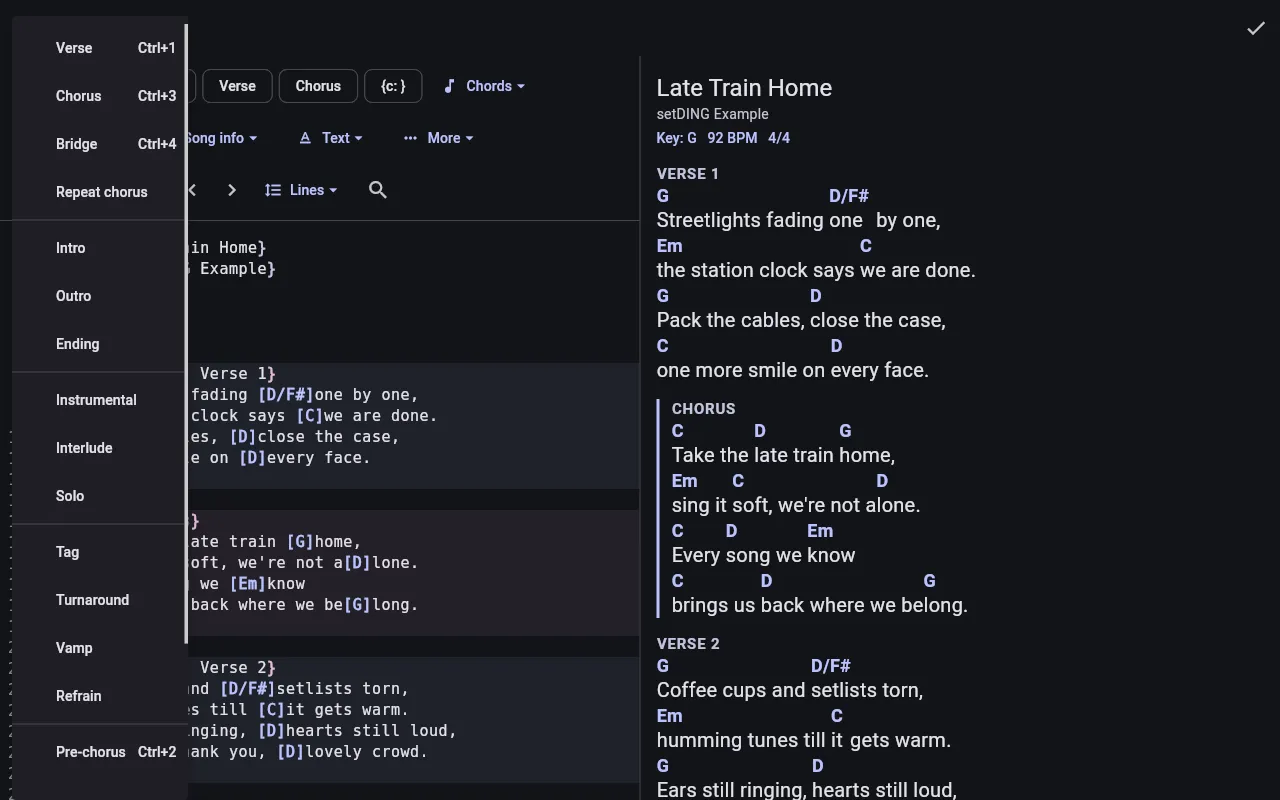
Text and preview
Section titled “Text and preview”On wide screens the text and the preview are side by side; on narrow ones you switch between Text and Preview. The preview shows the song the way the band sees it.
Insert instead of typing
Section titled “Insert instead of typing”The bar above the text inserts what you need without you having to know the ChordPro syntax:
- Insert chord, Insert verse, Insert chorus and Insert comment right in the bar.
- Chords – e.g. Optional chord, No chord (N.C.), Chord diagram.
- Sections – intro, bridge, solo, outro and more, Tab, Chord grid and Repeat chorus.
- Song info – Title, Artist, Key, Capo, Tempo (BPM), Time signature, Song sequence, CCLI number and more.
- Text – comments, Bold, Italic, Colour and more.
- More – Column break, Page break, Image, ABC notation and more.
Song details edits the title, key, tempo and other details in a form. While you type, the editor suggests matching chords and directives.
Edit lines
Section titled “Edit lines”Lines has Move line up, Move line down, Duplicate line, Delete line and Comment out line (#), plus Move chord left and Move chord right to move a chord by one syllable. Tapping a line number selects the whole line. Undo and Redo step back and forth.
Search and replace
Section titled “Search and replace”Search finds text in the song, with Match case if you like. Replace replaces single matches, Replace all all of them.
Chords above lyrics
Section titled “Chords above lyrics”Many chord sheets on the internet write the chords on a line of their own above the lyrics. When you paste such a text, setDING offers to convert it (Convert). For text that is already in the editor: Convert chords above lyrics.
Bar lines as chord grids
Section titled “Bar lines as chord grids”Some songs, e.g. from CCLI SongSelect, write instrumental parts as bar lines in
chord brackets, e.g. [|][G/B] [C2] [.] [.][|]. The editor marks such lines with a
dotted line and shows a hint above the text: Convert turns them into a chord
grid, with the comment above as its label. Measures with fewer chords are filled
up with empty cells so the columns line up. For single blocks: select them and
use Convert bar lines to chord grids in the Lines menu. The hint can be
hidden with ✕.
Save saves the song for everyone. If setDING finds places that will probably not be shown as intended – e.g. a bracket that is never closed – it asks Check the ChordPro? and names the lines. You can Fix automatically, Keep editing or Save anyway.
To see everything ChordPro can do, import the sample song
feature-showcase.zip
and open it in the editor.