

Key and sequence
A song is stored the way it was written. How your band plays it – in which key, in which sequence, at which tempo – you set without changing the song. setDING has two levels for this:
- Band arrangement: how the band always plays the song. Applies in all the band’s sets.
- Set: what is different tonight, e.g. two semitones lower or without the second verse. Applies in this set only.
What is set in the set wins; otherwise the band arrangement applies, otherwise the song. The band’s Leader and Set planner and the admins of the organization may change both. The other bands of the organization are not affected, and every musician can still transpose or set a capo just for themselves on top.
The band arrangement
Section titled “The band arrangement”- On Sets, select the band.
- Open the song on Songs and tap Band arrangement at the top.
- Set:
- the key with Key of the band – for all its sets,
- the sequence with Sequence,
- the tempo with Tempo (empty means: as in the song).
Reset the band arrangement to the song removes the arrangement again. In the song list, a band icon next to a song shows that the band has an arrangement for it.
The key in the set
Section titled “The key in the set”Each song of the set shows its key on the right. Tap it and pick one of the twelve keys (Key in this set – for the whole band). If the band has an arrangement, its key is the starting point: “−2” means two semitones below the band’s key.
The song sequence in the set
Section titled “The song sequence in the set”The song sequence says in which order the parts of the song are played, e.g.
I, V1, C, V2, C x2, B, O (intro, verse 1, chorus, verse 2, chorus twice, bridge,
outro).
- In the song’s ⋮ menu, tap Song sequence for this set.
- Under Parts of the song, tap the parts in the order you play them, or drag them into the sequence. Long-press a part to move it; Clear starts over.
- Edit as text lets you type the sequence directly.
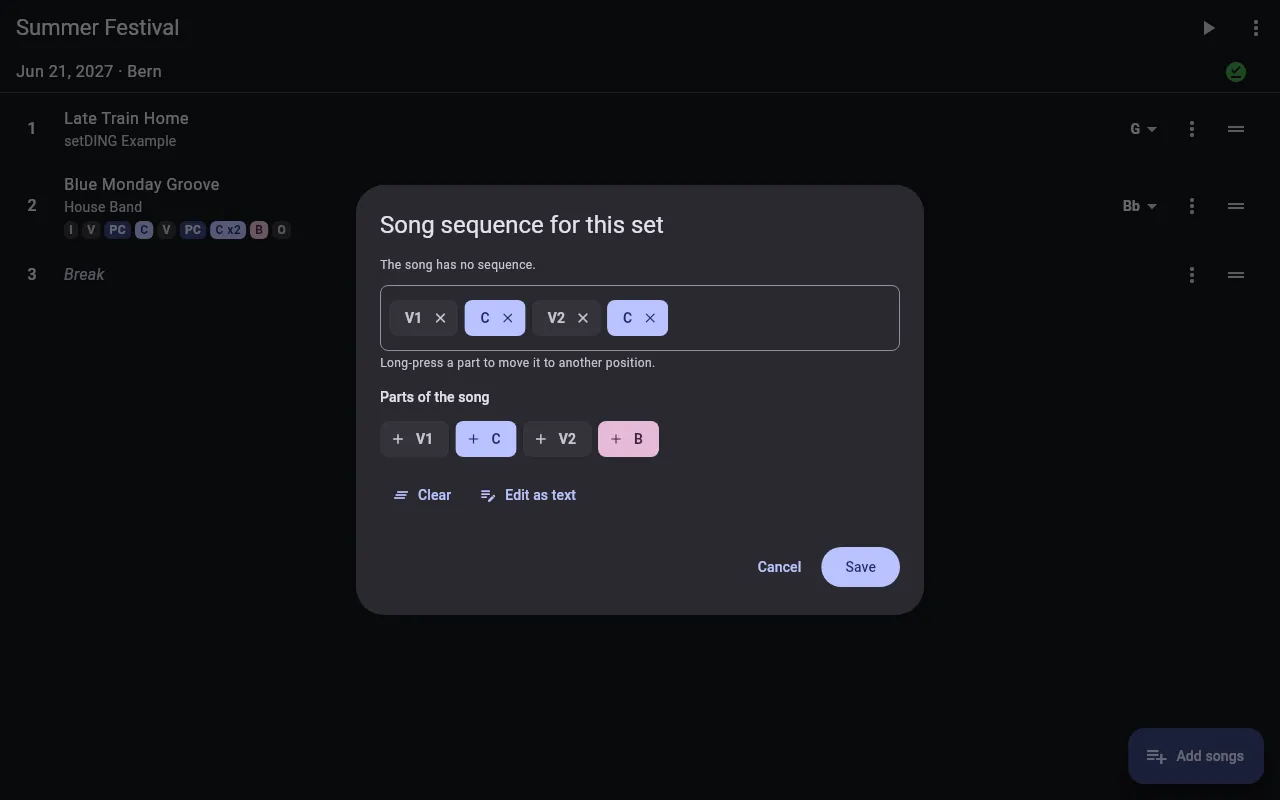
Use the song’s sequence removes a set sequence again. In live mode, an icon next to the sequence shows where it comes from: Sequence changed for this set or Sequence of the band.
In live mode, setDING shows only the parts that appear in the sequence and names the hidden parts in the song’s header. Opening the song on its own always shows all of it.
PDF or chords in live mode
Section titled “PDF or chords in live mode”If a song has PDF attachments, an icon next to the key shows what you see in live mode: the ChordPro text or one of the PDFs. Tap it to switch. This choice is yours alone and applies in all sets.