

ChordPro syntax
Songs are written in ChordPro, an open text format for chord sheets. A ChordPro file is plain text: you can write it in the built-in editor, edit it in any text editor and exchange it with other ChordPro programs. This page shows the essentials; setDING supports the whole specification.
The basic rules
Section titled “The basic rules”- Chords go in square brackets right before the syllable they are played on:
A[G]mazing [G7]grace. - Directives go in curly braces on a line of their own:
{title: Amazing Grace}. They set song details, open and close sections or add comments. - Lines starting with
#are notes in the file and are never shown.
{title: Amazing Grace}{artist: John Newton}{key: G}{tempo: 72}{time: 3/4}
{start_of_verse: Verse 1}A[G]mazing [G7]grace, how [C]sweet the [G]soundThat [G]saved a wretch like [D]me{end_of_verse}
{start_of_chorus}[C]Chorus [G]lyrics{end_of_chorus}
{comment: Let it ring out slowly}{chorus}
Song details
Section titled “Song details”| Directive | Meaning |
|---|---|
{title: …}, {subtitle: …} |
Title and subtitle |
{artist: …}, {composer: …}, {lyricist: …} |
Artist, composer, lyricist |
{key: G} |
Key; the starting point for transposing and Nashville numbers |
{capo: 2} |
Capo |
{tempo: 96} |
Tempo in BPM for the beat and the click |
{time: 4/4} |
Time signature (4/4 if missing) |
{duration: 3:45} |
Duration |
{ccli: 12345}, {copyright: …} |
CCLI number and copyright |
Sections
Section titled “Sections”A section starts with {start_of_…} and ends with {end_of_…}. The text after the
colon is its label.
| Section | Directives |
|---|---|
| Verse | {start_of_verse: Verse 1} … {end_of_verse} (short sov / eov) |
| Chorus | {start_of_chorus} … {end_of_chorus} (short soc / eoc) |
| Bridge | {start_of_bridge} … {end_of_bridge} |
| Other parts | e.g. {start_of_intro} … {end_of_intro}, also outro, solo |
| Tab | {start_of_tab} … {end_of_tab} |
| Chord grid | {start_of_grid} … {end_of_grid} |
{chorus} repeats the last chorus without writing it out again.
{comment: …} (short {c: …}) shows a hint, e.g. “play twice”.
The label also tells setDING which part of the song a section is: “Verse 2”, “Chorus”, “Pre-Chorus”, “Bridge”, “Intro” and “Outro” are recognized in English and German. Sections without a label count by their kind (verse, chorus, bridge). The song sequence builds on these parts.
Only for one instrument or voice
Section titled “Only for one instrument or voice”Add a hyphen and a name to a directive, and only those who entered that instrument (My instrument) or that name (My name or voice) in the settings under Musician see it:
{comment-guitar: Capo 2, fingerpicking}{comment-drums: half-open hi-hat}{comment-guitar!: for everyone but guitar}
{start_of_verse-alto: Alto}Only the alto voice sees this verse.{end_of_verse}
The instruments are called guitar, ukulele, bass, keyboard, vocals and
drums. A ! at the end reverses the condition.
setDING directives
Section titled “setDING directives”Where ChordPro has nothing to offer, setDING adds directives of its own. They all
start with x_, as the ChordPro specification intends for custom extensions. Other
ChordPro programs ignore them, so your songs stay portable.
Song sequence: {x_sequence}
Section titled “Song sequence: {x_sequence}”The song sequence says in which order the band plays the parts:
{x_sequence: I, V1, C, V2, PC, C x2, B, O}- Parts are separated by commas.
- A number picks a specific part:
V2is the second verse,Vmatches every verse. - Write repetitions as
C x2,2x CorC (2x). - Unknown names (e.g.
Coda) match a section with exactly that label.
| Part | Abbreviations |
|---|---|
| Intro | I, In, Intro |
| Verse | V, Vs, Verse, S, Str, Strophe |
| Pre-chorus | PC, Pre, PR, Pre-Chorus, Prerefrain |
| Chorus | C, Ch, Chorus, R, Ref, Refrain |
| Post-chorus | PoC, Post-Chorus |
| Bridge | B, Br, Bridge |
| Interlude | Int, Interlude, Zw, Zwischenspiel |
| Instrumental | Inst, Instr, Instrumental |
| Solo | Solo |
| Tag | T, Tag |
| Outro | O, Out, Outro, End, Ending, Schluss |
The sequence is shown below the song’s subtitle. In live mode setDING shows only the parts it contains, and the song map for drums follows exactly this order. If your band plays the song differently, set the sequence in the band arrangement or in the set without changing the song; see Key and sequence.
Accents in odd meters: {x_time_grouping}
Section titled “Accents in odd meters: {x_time_grouping}”setDING counts odd meters such as 5/8 or 7/8 in eighths and accents only the 1. With
{x_time_grouping} you state how the eighths are grouped; the beat display and the
click then accent the start of each group:
{time: 7/8}{x_time_grouping: 2+2+3}{tempo: 210}Songs for drums
Section titled “Songs for drums”For drums, three things in a song matter most: tempo, time signature and sequence. From these, setDING builds the beat display, the count-in, the click and the song map in live mode.
{tempo: …}is the tempo in BPM. In simple meters (2/4, 3/4, 4/4) it counts quarters, in 6/8, 9/8 and 12/8 dotted quarters – the way bands state the tempo – and in odd meters eighths.{time: …}is the time signature. The first{tempo}and the first{time}of the song apply.{x_sequence: …}orders the song map.- Write drum notes with
-drums. The song map shows them with the part they are in, together with the first lyric line as a cue. Anyone playing another instrument does not see them.
{title: Example}{key: E}{tempo: 128}{time: 4/4}{x_sequence: I, V1, C, V2, C, B, C x2, O}
{start_of_intro}{comment-drums: 4 bars toms only, then full kit}[E] [A] [E] [B]{end_of_intro}
{start_of_verse: Verse 1}{comment-drums: closed hi-hat, snare on 2 and 4}[E]First line of the [A]verse{end_of_verse}
{start_of_chorus}{comment-drums: ride, crash on every 1}[A]Chorus to sing [E]along{end_of_chorus}
{start_of_bridge}{comment-drums: halftime}[C#m]Bridge [A]lyrics{end_of_bridge}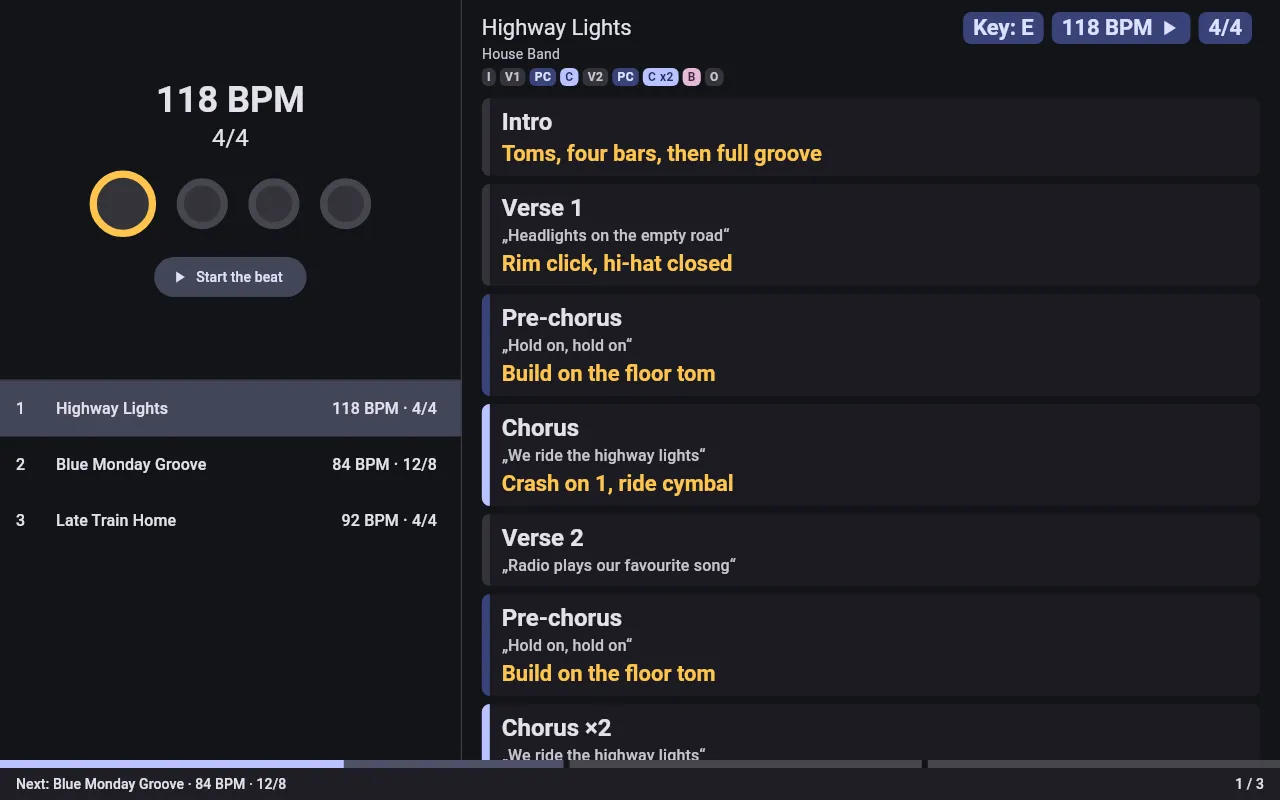
Everything at a glance
Section titled “Everything at a glance”The example song
feature-showcase.zip
uses every directive setDING knows. Import it under Songs and open it in the
editor. The complete description of the format is in the
ChordPro specification.