

Organizations and bands
An organization is, for example, a music school, a church or simply your band. It owns the songs and the people. A band is a group of people from the organization who play together; every band has its own sets and band arrangements. All bands of an organization share the same song library.
Organizations and bands need an account: Settings → Account & sync → Sign in (where you can also Create account, see Account and sync). Without an account, setDING works on your device only, in the band On this device.
Manage bands
Section titled “Manage bands”Everything about your organizations and bands is in Settings → Organization & bands, or on Sets in the Switch band menu → Manage bands. The list shows your organizations with their bands; tap an organization or band to open it. What you can change there depends on your role; as a member you see your bands and can leave them. The category appears once you are signed in.
Found an organization
Section titled “Found an organization”The operator of your server decides how new organizations come about:
- Invitation only (usual): the server operator sends you a founder invitation. Open the link, sign in or create an account and tap Found organization. You become the admin of the new organization.
- Open: in Organization & bands, tap New band and choose New organization as the Organization.
Create a band
Section titled “Create a band”Admins of the organization tap New band in Organization & bands, enter a Band name and choose the Organization.
The organization
Section titled “The organization”In the organization, everybody sees the Bands and the People. Admins can also:
- change the Organization name and create more bands,
- change everybody’s role (see Roles),
- invite people (see Invitations),
- Remove from organization. The person then also leaves all bands of the organization.
Leave organization takes you out yourself; you then also leave all its bands and no longer see its songs.

The band
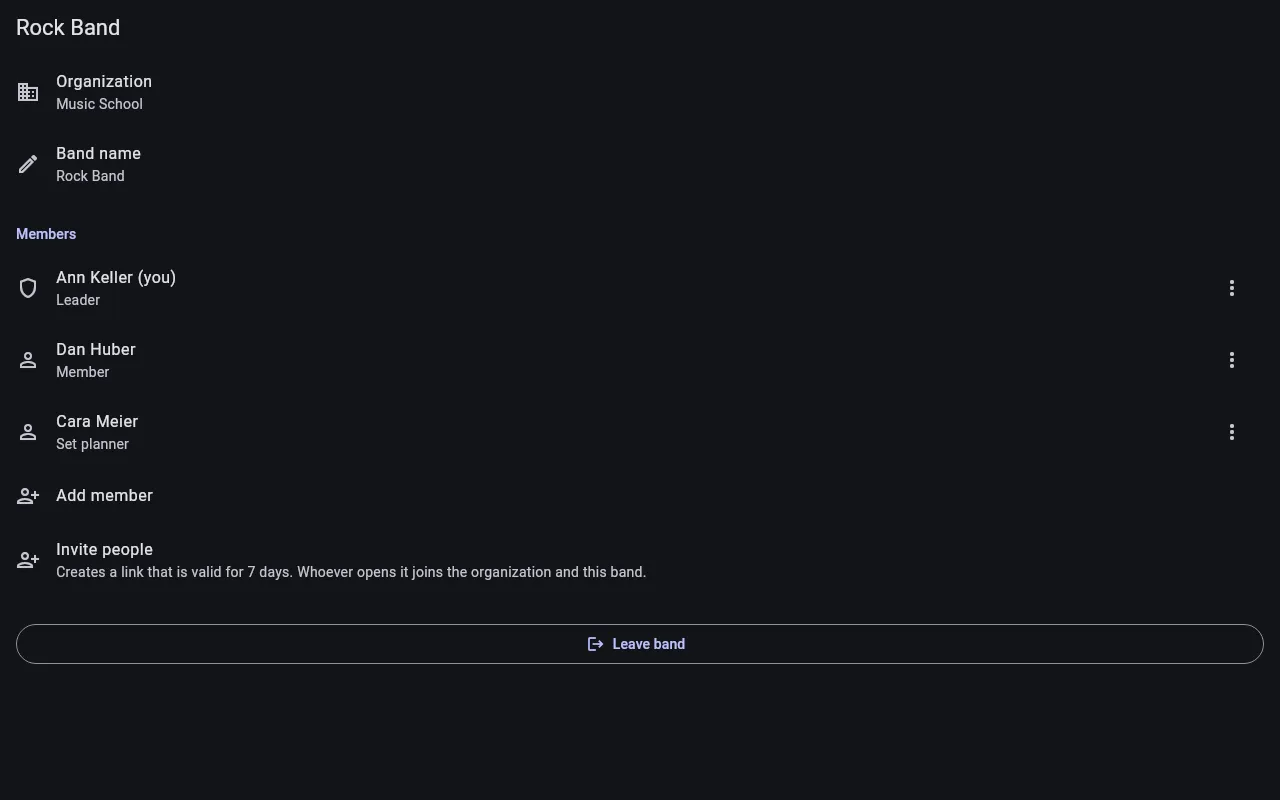
Section titled “The band”The band shows its Members. The band’s Leader and the admins of the organization can:
- change the Band name,
- take people of the organization into the band with Add member,
- invite new people straight into the band,
- change roles in the band and Remove from band.
Leave band takes you out yourself. A band always needs at least one leader.
Switch between bands
Section titled “Switch between bands”If you are in several bands, choose the band you work with on Sets at the top with Switch band: you then see its sets, and songs show its band arrangement. On Songs, Switch song library changes the organization.
Copy to band takes a set or songs into another band or organization.